When Your Hypervisor Is Too Helpful: Forcing Proxmox VM Traffic Through an Inline Network Tap
Tonight’s malware-lab adventure began with a mystery.
I have an inline Debian network tap sitting between my malware-analysis environment and OPNsense. The goal is straightforward: all VM traffic should traverse the tap so I can inspect, log, and control exactly what enters and leaves the environment.
At least, that was the goal.
I noticed traffic from one VM:
172.20.200.73
to another:
172.20.200.200
was not behaving the way the network diagram said it should.
The tap could see packets in some circumstances, my firewall rules were doing unexpected things, and OPNsense was not seeing traffic that should have been reaching it.
Naturally, I started with iptables.
My tap is aggressively filtered. INPUT, OUTPUT, and FORWARD all default to DROP, with explicit exceptions for allowed traffic. I could see TCP SYNs such as:
172.20.200.73:56530 -> 172.20.200.200:1501
172.20.200.73:56530 -> 172.20.200.200:19315
172.20.200.73:56530 -> 172.20.200.200:1840
but I wasn’t seeing the expected blacklist logs.
At first, bridge netfilter looked suspicious.
It wasn’t.
net.bridge.bridge-nf-call-iptables = 1
net.bridge.bridge-nf-call-ip6tables = 1
br_netfilter was loaded too.
Then I noticed the RELATED,ESTABLISHED rule counters going wild during an Nmap scan.
That looked promising, but it still wasn’t the root cause.
Proxmox Was Taking a Shortcut
The real answer appeared when I looked at the Proxmox bridge configuration.
All three relevant VMs were attached to the same bridge:
VM 2002 -> VMData -> 172.20.200.63
VM 3002 -> VMData -> 172.20.200.73
VM 3999 -> VMData -> 172.20.200.200
That meant Proxmox had absolutely no reason to send .73 -> .200 out onto the physical network.
They were on the same Layer-2 bridge.
Instead of:
VM .73
  ↓
Proxmox
  ↓
network tap
  ↓
OPNsense
  ↓
network tap
  ↓
VM .200
the actual path was basically:
VM .73
  ↓
VMData
  ↓
VM .200
My elaborate inspection path was being bypassed because Linux was doing exactly what an Ethernet bridge is supposed to do.
How inconsiderate.
Blocking Guest-to-Guest Switching
The first part of the solution was to stop Proxmox from directly forwarding traffic between VM-facing ports.
A guest-isolation guard now prevents VM-to-VM forwarding inside VMData while still allowing traffic to leave through the physical uplink.
Conceptually:
guest -> guest      DROP
guest -> enp7s0     ALLOW
enp7s0 -> guest     ALLOW
Problem solved?
Of course not.
Because Ethernet had another opinion.
ARP Enters the Chat
The VMs are all in:
172.20.200.0/24
So when .73 wants to communicate with .200, it does not send the packet to the gateway.
It asks:
Who has 172.20.200.200?
If guest-to-guest switching is blocked, .200 never receives that ARP request and therefore never answers it.
The host does not think:
“Well, direct Layer-2 communication failed. I guess I’ll send it to the router.”
That is not how IP works.
So I needed the VMs to believe that OPNsense itself was the Layer-2 destination for other VM addresses.
Enter Proxy ARP.
OPNsense Becomes Everyone
I configured OPNsense to Proxy ARP for the VM network.
Now when .73 asks:
Who has 172.20.200.200?
OPNsense responds:
172.20.200.200 is at <OPNsense MAC>
The same thing happens for the other VM addresses.
So the packet now goes:
VM .73
  ↓
OPNsense MAC
  ↓
network tap
  ↓
OPNsense
  ↓
network tap
  ↓
VM .200
The VMs still think they are on one flat /24, but they are effectively being routed through OPNsense.
This is gloriously weird.
Then the Tap Started Arguing With OPNsense
One address produced two ARP responses:
172.20.200.100
That address belongs to the Debian network tap itself.
The tap has:
br0 = 172.20.200.100/24
So Linux was correctly answering:
“Yes, 172.20.200.100 is me.”
Unfortunately, OPNsense was also answering on behalf of .100.
I had accidentally created an ARP custody dispute.
The fix was to make the tap continue owning .100 at Layer 3 while refusing to advertise that ownership directly at Layer 2.
The tap already had a native nftables bridge table protecting against ARP impersonation:
table bridge vmdata_l2_guard
I added an input chain:
chain input {
    type filter hook input priority filter; policy accept;

    arp operation request
    arp daddr ip 172.20.200.100
    counter
    drop
    comment "suppress local ARP reply for tap IP"
}
The important distinction is that this blocks local ARP processing while still allowing the ARP broadcast to be bridged onward to OPNsense.
So now:
VM:
Who has .100?

Debian tap:
...

OPNsense:
ME.
The tap still receives routed traffic destined for .100; it simply no longer tells neighboring machines to send Ethernet frames directly to its own MAC.
Making It Persistent
The network tap already had a dedicated native nftables configuration:
/etc/nftables.d/vmdata-l2-guard.nft
loaded by:
/usr/local/sbin/load-vmdata-l2-guard
with a systemd unit:
vmdata-l2-guard.service
So the ARP suppression rule went into the existing guard instead of adding yet another firewall-management mechanism.
That matters because this system also uses iptables-nft rules restored by netfilter-persistent.
One thing I definitely did not want to do was enable the generic /etc/nftables.conf, which currently contains:
flush ruleset
That would make for a very memorable reboot.
Where Things Stand Now
The final behavior is becoming exactly what I wanted:
VM
 ↓
cannot switch directly to another VM
 ↓
physical uplink
 ↓
Debian network tap
 ↓
OPNsense Proxy ARP / routing
 ↓
Debian network tap
 ↓
destination VM
The hypervisor can no longer quietly shortcut VM-to-VM traffic.
The tap sees the traffic.
OPNsense controls the forwarding.
And the VMs remain on the same logical /24.
Five Years Later
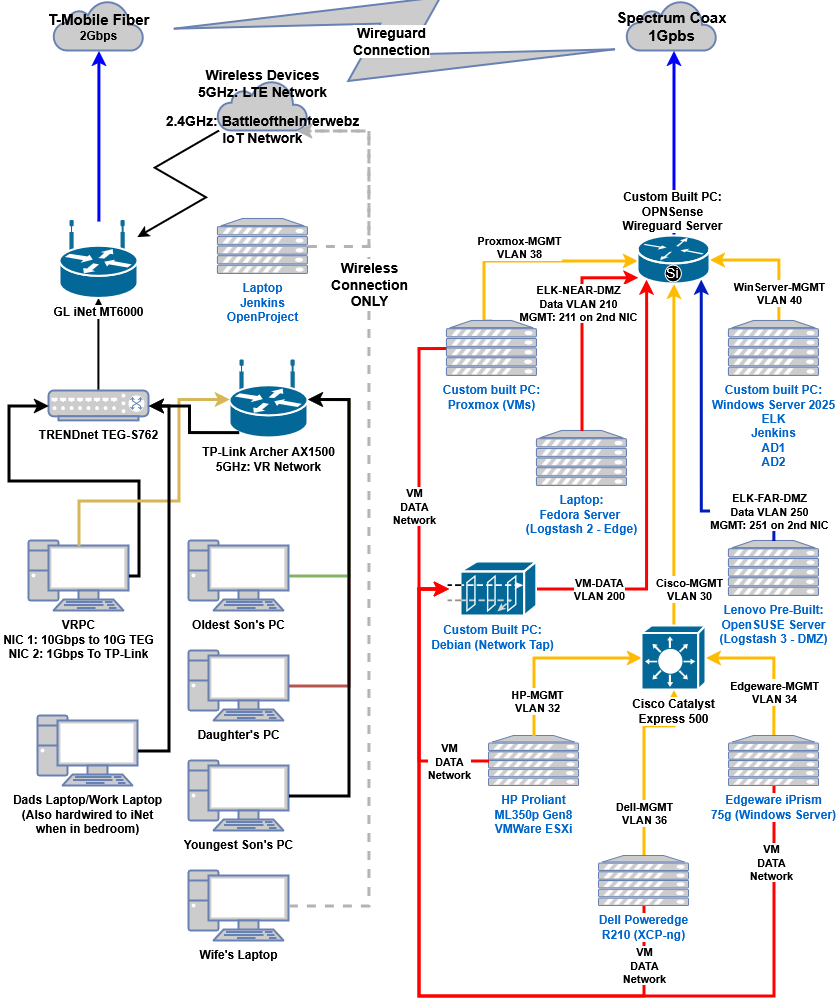
Five years later, nearly every physical component in the original diagram has been replaced or upgraded.
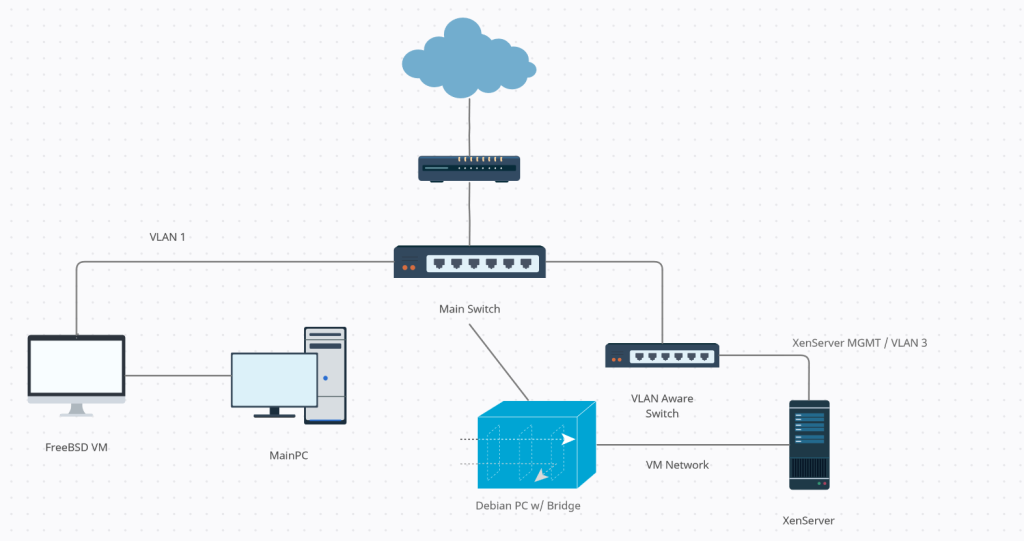
One thing has remained remarkably constant: the little Debian bridge icon.
Not the hardware—the machine behind it has changed.
But unlike almost everything else in the lab, its job really hasn’t.
In 2021, that Debian system was already intended to sit inline between the malware environment and the outside network, observing and controlling the traffic that crossed the boundary.
In 2026, that same concept remains at the center of the design.
The infrastructure surrounding it has grown dramatically more sophisticated: Proxmox, OPNsense, dedicated management networks, DMZ collectors, ELK, Logstash, WireGuard, bridge isolation, Proxy ARP, strict firewall policies, and mechanisms specifically designed to prevent the hypervisor from finding a shortcut around the inspection path.
But the fundamental idea represented by that icon has survived all of it:
If the malware wants to communicate with something outside its environment, the traffic goes through the Debian tap.
The hardware changed.
The implementation matured.
The network around it became vastly more complicated.
But apparently the architectural decision I drew in 2021 was the part I got right the first time. 😂